


3D Digital Luminous Alarm Clock With Remote
3D Digital Luminous Alarm Clock With Remote


 and 1,00,000 people purchased
⏰ 3D LED Display – Bright and easy to read
📅 Time, Date & Temperature – All info at a glance
✨ Modern 3D Design – Stylish home decor
🔘 Easy 3-Button Setup – Simple to use
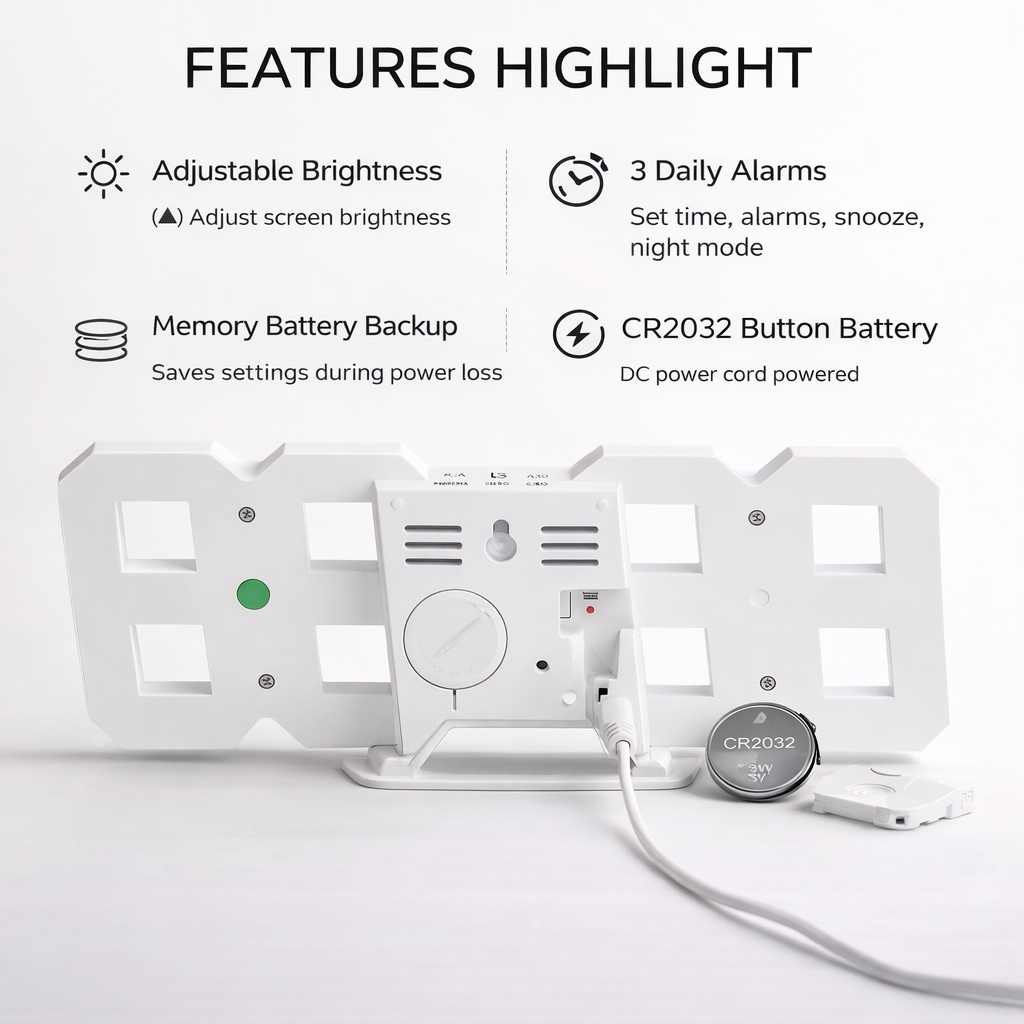
🔋 Memory Backup – Saves settings
🔇 Silent Operation – No ticking noise
Imported Items
Very Limited Stock
Extra 10% off on prepaid orders
Couldn't load pickup availability
Get it between - and -.
-

Maine ye 3D LED digital clock apne living room ke liye liya tha aur honestly iska look bahut premium lagta hai. Wall pe lagane ke baad pura room modern feel deta hai. Display kaafi bright hai aur door se bhi time clearly dikh jata hai. Installation bhi simple tha.
-

Maine ye clock apne study table ke liye order kiya tha aur mujhe kaafi pasand aaya. Time, date aur temperature ek saath dekhne ko mil jata hai jo kaafi convenient hai. Students aur work-from-home logon ke liye ye ek perfect digital clock hai.
-

Clock ka 3D LED display kaafi attractive hai aur setup karna bhi easy tha. USB se power milti hai aur memory battery bhi hai, isliye light chali jaye to bhi time reset nahi hota. Office desk ya study table dono ke liye kaafi useful product hai.


3D Digital Luminous Alarm Clock With Remote

FEATURED ON


Bright, Stylish & Always On Time
Upgrade your desk or bedside with a modern 3D LED clock featuring adjustable brightness, temperature display and smart alarm functions.
✔ Large glowing digits
✔ Night-friendly brightness
✔ Perfect for bedroom & office

💖 WHY CUSTOMERS LOVE THIS
Checking time should be easy and stylish. This LED clock combines modern design and smart functionality, with a bright display that’s easy to read and adjustable brightness for night comfort. Perfect for your desk, bedside, or wall.
🎯 IDEAL FOR
👨💻 Office Work – Easy time check while working
🎓 Students – Perfect for study desks
🛏 Bedroom Use – Soft night brightness
🏠 Home Decor – Modern LED style
🎁 Great Gift – For friends & family

⚙️ KEY FEATURES
⏰ 3D LED Display – Large easy-to-read numbers
🌙 3 Brightness Modes – Bright, medium & night dim
🌡 Temperature Display – Shows room temperature
⏰ Dual Alarm – Set daily wake-up alarms
🔄 12/24 Hour Mode – Choose your time format
🔌 USB Powered – Stable power with memory backup

🎥 HOW IT WORKS
1️⃣ Plug the clock using the USB cable.
2️⃣ Set time using the back buttons.
3️⃣ Adjust brightness according to your environment.
4️⃣ Enable alarm and snooze mode if needed.
5️⃣ Enjoy a stylish glowing desk clock every day.

Shipping & Returns
Shipping & Returns
All orders are processed by our extra careful fulfillment team within 48-72 hours. Deliveries depending on your locations will take from 5-7 days.
Our guarantee to you
Our guarantee to you
We stand by our products 100% – if you're not completely satisfied, we'll make it right.


10,000+ Happy Customers
✦
Quality You Can Trust
✦
Quick And Easy Returns
✦
30 Days Guarantee
✦
Fast Shipping
✦
10,000+ Happy Customers
✦
Quality You Can Trust
✦
Quick And Easy Returns
✦
30 Days Guarantee
✦
Fast Shipping
✦
10,000+ Happy Customers
✦
Quality You Can Trust
✦
Quick And Easy Returns
✦
30 Days Guarantee
✦
Fast Shipping
✦
10,000+ Happy Customers
✦
Quality You Can Trust
✦
Quick And Easy Returns
✦
30 Days Guarantee
✦
Fast Shipping
✦
⭐ Perfect for adding a futuristic touch to your home decor
Shows time, date, and temperature at a quick glance.


Comparison with Similar Brands
Discover the difference with our brand, where we blend exceptional quality
| BBL™ | Others | |
|---|---|---|
Stylish Luminous Display |
||
Memory Battery Backup |
||
Shows Time, Date, Temperature |
||
Simple 3-Button Control |
||
USB Powered Design |
||
3 Brightness Modes |

Results You Can Expect
96%
Shows time, date, and temperature at a quick glance.
94%
Keeps your settings saved even during power interruptions.
92%
A smart decorative clock ideal for bedrooms, offices, and living rooms.
90%
User-friendly 3-button setup
Frequently Asked Questions (FAQs)
Does the clock run on batteries?
Does the clock run on batteries?
No, the LED display requires constant USB power to function. The internal button battery is only used to store memory settings in case of a power interruption.
Can I hang it on the wall?
Can I hang it on the wall?
Yes, the clock features notches on the back for easy wall mounting. The desktop stand is fully removable for a flush, clean wall-mounted look.
Is it too bright for a bedroom?
Is it too bright for a bedroom?
The clock includes 3 adjustable brightness levels and an automatic dimming function that lowers intensity at night, making it comfortable for bedroom use.
How do I switch between Fahrenheit and Celsius?
How do I switch between Fahrenheit and Celsius?
While in temperature display mode, you can typically press and hold the UP button to toggle between °C and °F.
How do I turn off the alarm?
How do I turn off the alarm?
When the alarm sounds, you can press any button to snooze, or press and hold a specific button (usually MODE or SET) to turn the alarm off for the day.
✦

✦

✦

✦

✦

✦
✦
✦
✦
✦
✦
✦
✦
✦
✦
✦
✦
✦
✦
✦